|
<< Click to Display Table of Contents >> System Setup and Customization > Control Panel > Account customization > Technical customization > Privacy Settings |
General
Privacy settings allow you to configure additional privacy options like removing visitor's IP and host name from real time monitoring, chat transcripts and offline messages as well as adding a mandatory data processing consent checkbox to your Pre-chat survey an Offline form. Privacy Settings page can be accessed through your account Control Panel Account Settings / Privacy Settings:

Privacy Settings
1.By enabling (1) option IPs and host names of your visitors will be removed from your real-time monitoring, chat transcripts and offline messages. Here is an example of hiding an IP address in our native agent app:

Hidden IP on the console
2.By enabling (2) option a personal data processing consent with a mandatory checkbox will be added to the Pre-chat survey:

Adding a privacy statement to the Pre-chat Survey
3.By enabling (3) option a personal data processing consent with a mandatory checkbox will be added to the Offline Form:

Adding a privacy statement to the Offline Form
4.A consent text area allows adding a text of your personal data processing consent message. It will be displayed along with a mandatory checkbox. Basic HTML formatting is supported:

Consent message example
Consent confirmation
It is important to show that the consent checkbox was activated. This information is passed to agent apps, offline messages and chat transcripts.
In the agent app the information is displayed in the "Consent" field".
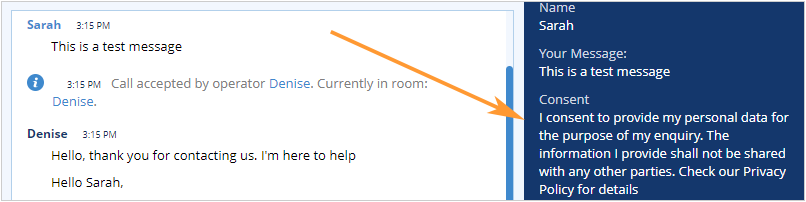
Consent field in the web based agent app
The text of the consent field appears in the Client Data section in the chat transcripts app.
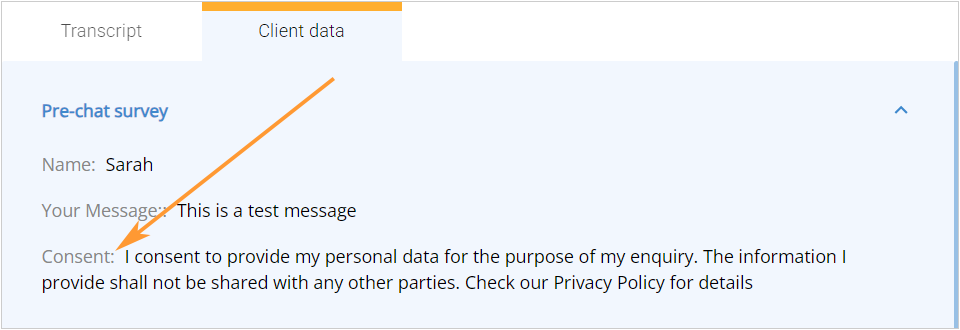
Consent text in the chat transcripts app
Both offline messages and chat transcripts sent by email contain this information at the bottom. below the message or chat conversation text.